
If Hydraflix is not working, the problem may not mean that the entire website is down. A page can load normally while a movie refuses to play, a video server keeps buffering, or the player shows an error. Hydraflix currently states that titles can use multiple video servers, so a failed source does not necessarily mean the whole service is unavailable.
There are several possible causes, including a temporary server problem, browser cache, network restrictions, an outdated browser, DNS issues, or a problem with a particular video source. This guide explains how to identify the cause and what you can safely try before assuming Hydraflix itself is offline.
Is Hydraflix Down Right Now?
The first thing to determine is whether Hydraflix is down for everyone or only not working on your device.
At the time this article was researched, the Hydraflix website at hydraflix.cc was reachable, and its homepage and movie catalogue were returning content. The site’s current FAQ also identifies hydraflix.cc as its official domain.
That does not guarantee that every movie, episode, or video server will work. Hydraflix explains that individual titles can have multiple playback servers and recommends switching between them when one source is slow or unavailable.
Quick diagnosis
| What you see | Most likely explanation | First thing to try |
| Website will not open | Network, DNS, browser, or site availability issue | Test another website and reload |
| Homepage loads but movie does not | Video source problem | Switch server/source |
| Video keeps buffering | Slow connection or overloaded source | Try another server and lower quality |
| Player stays black | Browser/player compatibility issue | Try another browser |
| Only one movie fails | Broken or unavailable source | Try another title or source |
| Hydraflix works on mobile data but not Wi-Fi | Network or ISP-specific issue | Restart router and check DNS/network settings |
| Page works in private browsing | Cache, cookie, or extension conflict | Clear site data |
| Audio is missing | Player, browser, or source issue | Check player volume and try another source |
Also Read: What Happened to Hydraflix?
Why Is Hydraflix Not Working?
There is no single cause. Streaming websites depend on several components working together: the website interface, content metadata, external video hosts, your browser, your internet connection, and the network path between your device and the server.
A problem with any one of these can make Hydraflix appear broken.
1. The video server is unavailable
This is one of the most important possibilities.
Hydraflix says that titles are available through multiple servers and specifically advises users to change servers if one source is slow in their region.
So if the homepage loads but the player refuses to start, do not immediately conclude that Hydraflix is completely down.
Look for the available server or source options below or around the video player and test another one.
2. Hydraflix is buffering continuously
Buffering can happen when the selected video host is overloaded or when your connection cannot download the stream quickly enough.
Community reports have described Hydraflix buffering problems where changing servers helped in some cases, while other users reported that all available sources were buffering at the time.
Try these steps:
- Stop the video.
- Reload the page.
- Select another available server.
- Lower the video quality if the player provides that option.
- Pause other downloads or high-bandwidth applications.
- Test another title.
If other websites stream normally while one particular Hydraflix source continually buffers, the source itself may be the limiting factor.
3. Your browser cache is causing a problem
Browsers store files, cookies, scripts, and other site data to make websites load faster.
Sometimes old or corrupted site data can interfere with a website after its scripts or interface have changed.
Try opening Hydraflix in a private or incognito window.
If the site works there, the problem may be related to cached data, cookies, or an installed browser extension.
You can then clear the site’s stored data and reopen the normal browser window.
Also Read: Is Hydraflix Down?
4. A browser extension is interfering
Privacy extensions, script blockers, content filters, and other browser add-ons can sometimes prevent parts of a video player from loading.
This does not mean you should disable security software permanently.
Instead, use a controlled test:
- Open a private browsing window.
- If your browser allows extensions in private mode, make sure they are not running.
- Test the page.
- If the player works, investigate which extension is interfering.
Avoid installing unknown browser extensions simply because a website tells you that one is required.
5. Your internet connection is unstable
A connection can appear fast during ordinary browsing but still struggle with continuous video playback.
Streaming requires a sustained data connection rather than occasional page requests.
Try:
- Restarting your router.
- Moving closer to the Wi-Fi access point.
- Disconnecting unnecessary devices.
- Testing another network.
- Checking whether other video services work normally.
One particularly useful test is to compare Wi-Fi and mobile data.
If Hydraflix works on mobile data but not your home Wi-Fi, that points toward a network-specific issue rather than a universal Hydraflix outage.
Also Read: Hydraflix Free Movies
Hydraflix Website Loads but Videos Do Not Play
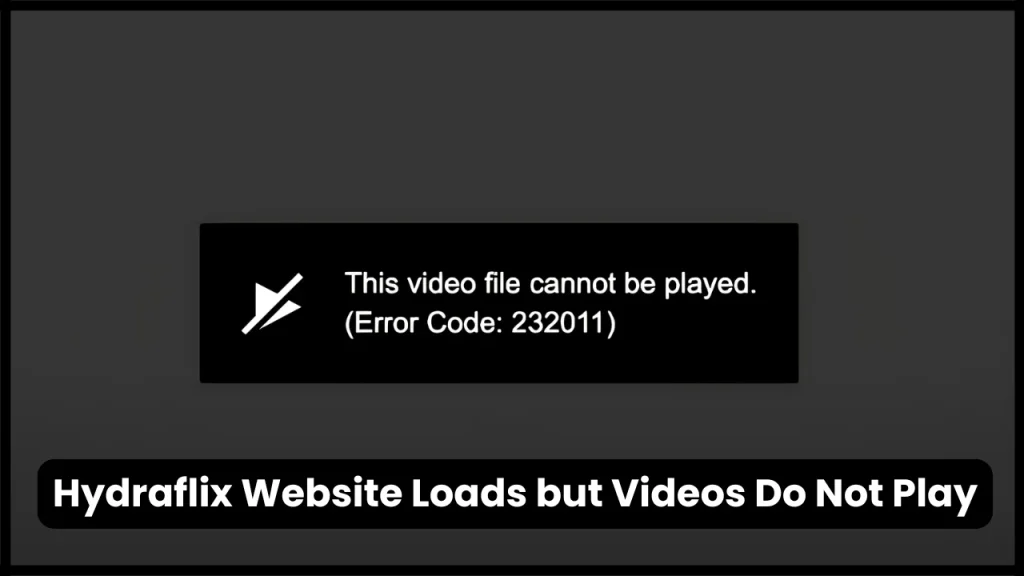
This situation is different from the entire website being offline.
The website interface can load because the web server is functioning, while the actual video playback depends on a separate host or source.
Hydraflix’s FAQ acknowledges this distinction and says that a video server may sometimes fail to load. Its recommended solution is to switch servers.
Try this order
Step 1: Refresh the page.
Step 2: Start the video again.
Step 3: Select another available server.
Step 4: Try a different movie or episode.
Step 5: Test another browser.
Step 6: Test another network.
This sequence helps isolate the problem instead of changing several settings at once.
Hydraflix Says “Oops, Try Again”
An error such as “Oops, try again” generally indicates that the selected playback source failed or that the player could not establish a usable connection.
A community report from June 2026 specifically mentioned Hydraflix showing an “oops, try again” message alongside buffering problems. Responses suggested trying another server, although some users reported that every available server was also failing at that time.
That distinction matters.
If one source fails, changing sources may solve the problem.
If every source fails, the issue could be broader, such as a temporary service-side problem, network restriction, or browser/network configuration issue.
Also Read: Hydraflix App
Hydraflix Not Working on Chrome
If Hydraflix does not work in Google Chrome, start with simple browser troubleshooting rather than changing advanced settings.
Try these Chrome fixes
- Reload the page with a normal refresh.
- Open Hydraflix in an Incognito window.
- Check whether JavaScript is enabled.
- Temporarily test without browser extensions.
- Clear the site’s stored data.
- Update Chrome if an update is available.
- Restart the browser.
If the website works in another modern browser but not Chrome, the problem is more likely to be browser-specific.
Do not download a random “Hydraflix Chrome extension” or an executable file simply to make the site work.
Hydraflix Not Working on Firefox
Firefox users can perform a similar test.
Open a private window and load the site again. If the problem disappears, investigate extensions and stored site data.
Also check whether Firefox is blocking a script or media component required by the player.
If one browser works and another does not, that is useful diagnostic information. It suggests that the website itself is reachable and the failure is occurring somewhere in the browser environment.
Also Read: HydraFlix TV
Hydraflix Not Working on Phone
The troubleshooting process is slightly different on smartphones because mobile browsers use different storage and network settings.
On Android
Try:
- Refreshing the page.
- Opening it in a private tab.
- Clearing browser cache.
- Testing another browser.
- Switching between Wi-Fi and mobile data.
- Restarting the phone.
On iPhone
Try:
- Reloading the page.
- Opening a private tab.
- Clearing website data if necessary.
- Testing another browser.
- Switching networks.
- Restarting the device.
If Hydraflix works on another device using the same Wi-Fi connection, the issue is probably local to the first device or browser.
Hydraflix Not Working on Smart TV

Hydraflix says its website can be accessed through browsers on devices including Samsung and LG TVs, Android TV, and Fire TV devices.
Smart TVs can nevertheless have browser compatibility limitations.
If playback fails:
- Restart the TV.
- Restart the browser.
- Reload the site.
- Try another available playback server.
- Check whether the TV browser is updated.
- Test the same title on a computer or phone.
This comparison is particularly useful.
If the same title works on your phone but fails on your TV, the problem is unlikely to be a complete Hydraflix outage.
Also Read: Is HydraFlix Safe?
Hydraflix Works on Mobile Data but Not Wi-Fi
This is one of the most useful diagnostic scenarios.
Suppose:
- Hydraflix fails on home Wi-Fi.
- Hydraflix works on mobile data.
- Other websites work on both connections.
The difference points toward the Wi-Fi network, DNS configuration, router, or ISP path.
What to test?
Restart your router first.
Then try another device on the same Wi-Fi network.
If Hydraflix fails on every device connected to that network but works through mobile data, the network itself deserves investigation.
Do not immediately install an unknown VPN or network application. First establish whether the problem is actually network-specific.
Could Your ISP or DNS Be Blocking Access?
Network-level filtering can sometimes prevent access to particular domains or external resources.
This is particularly relevant when a website works from one network but not another.
A simple diagnostic comparison is:
| Test | Result | What it suggests |
| Wi-Fi | Fails | Possible local/network issue |
| Mobile data | Works | Wi-Fi or ISP path may be involved |
| Another Wi-Fi | Works | Original network may be responsible |
| Every network | Fails | Service or source problem becomes more likely |
| Incognito | Works | Browser data or extension issue |
| Another browser | Works | Browser-specific issue |
This does not prove that an ISP is blocking Hydraflix, but it helps narrow the problem.
Also Read: Hydraflix Streaming
Hydraflix Video Has No Sound
A video can play correctly while audio fails.
Start with the obvious checks:
- Confirm your device volume is turned up.
- Check that the player is not muted.
- Test another video.
- Try another server.
- Test another browser.
- Check whether sound works on other websites.
There have also been community reports of Hydraflix playback with missing audio, showing that audio problems can occur independently from general website availability.
If only one movie or episode has no audio while other videos work, the particular source may be responsible.
Hydraflix Keeps Redirecting to Another Website
Unexpected redirects deserve more caution than ordinary buffering.
Community discussions have reported redirects from streaming pages to unrelated websites and suspicious verification pages.
If a page suddenly asks you to:
- Download an unknown application
- Install a browser extension
- Run an executable file
- Enter sensitive account information
- Give unusual browser permissions
- Complete suspicious verification steps
stop and close the page.
Do not assume that every popup or redirect is part of the legitimate Hydraflix website.
Hydraflix’s own FAQ says the site does not require an account, subscription, or payment, and says the official address is hydraflix.cc.
Be Careful With Hydraflix Copycat Domains
One complication with the Hydraflix search term is that multiple websites use the Hydraflix name.
Search results currently include domains such as hydraflix.cc, hydraflix.org, hydraflix.digital, and others. Their descriptions and claims are not necessarily interchangeable.
That creates an important distinction:
Finding a website with “Hydraflix” in its name does not automatically establish that it is the same service.
Hydraflix’s current FAQ specifically identifies hydraflix.cc as its official website.
Before entering information or downloading anything, verify the domain carefully.
Also Read: Hydraflix Alternative
Does Hydraflix Need an Account?
According to Hydraflix’s current FAQ, an account is not required. The site says users can access it without registration and that favorites and viewing progress are stored locally in the browser.
That means a prompt asking you to create an account, provide a password, or pay a subscription should not automatically be assumed to be a normal Hydraflix requirement.
Treat unexpected requests for credentials cautiously.
Does Clearing Cache Fix Hydraflix?
It can, but it is not a universal solution.
Clearing cache is useful when:
- The site recently changed.
- The page loads incorrectly.
- Buttons do not respond.
- The player worked previously.
- The website works in private browsing.
- Other browsers work normally.
It is less likely to fix a genuine server-side outage or a failed external video source.
A better approach is to use cache clearing as one diagnostic step rather than the answer to every Hydraflix problem.
What If Only One Movie or Episode Is Not Working?
This is usually easier to diagnose.
Try another title.
If:
- Movie A fails
- Movie B plays normally
the problem may be associated with Movie A’s particular source or metadata rather than the entire website.
Hydraflix says that broken title links can be reported through its contact page and that metadata is refreshed automatically.
This is also why repeatedly reinstalling your browser is unnecessary when only one title fails.
What If Every Movie Is Buffering?
When every title buffers, check the problem from several angles.
First, test your connection
Open another video service and see whether video playback is normal.
Second, change the network
Try mobile data or another Wi-Fi connection.
Third, change the browser
Test the same title in another modern browser.
Fourth, change the playback source
If several sources are available, compare them.
Fifth, wait and test again
If every device and every network is affected, a temporary service-side or source-side issue becomes more plausible.
Historical community reports show that Hydraflix availability has varied by user and date, with some users reporting downtime while others could still access the site.
A 5-Minute Hydraflix Troubleshooting Checklist
If you want the fastest possible process, follow this sequence:
- Check the domain. Make sure you are using the domain identified by Hydraflix as official.
- Reload the page.
- Try another movie or episode.
- Switch the video server/source.
- Open the site in private browsing.
- Try another browser.
- Restart your router.
- Compare Wi-Fi with mobile data.
- Check whether other websites and video services work.
- Stop if the site begins requesting suspicious downloads, extensions, passwords, or payments.
This approach gives you useful diagnostic information without randomly changing settings.
Hydraflix Troubleshooting Decision Tree
Use this simple logic:
Does the Hydraflix website open?
- No: Test your connection, browser, DNS/network, and whether the domain is currently reachable.
- Yes: Continue.
Does the movie player load?
- No: Try another browser, private browsing, and another title.
- Yes: Continue.
Does the video play?
- No: Switch the available server/source.
- Yes: Continue.
Does it buffer constantly?
- Yes: Test another source, reduce quality if available, and compare networks.
- No: The issue may already be resolved.
Does it fail only on one device?
- Yes: Focus on that device or browser.
- No: Investigate the network or service side.
Common Hydraflix Problems and Fixes
| Problem | Likely area | Recommended test |
| Hydraflix completely unavailable | Domain/network/service | Test another network |
| Homepage works, video fails | Video source | Switch server |
| Endless buffering | Source or connection | Try another source/network |
| Black player | Browser/player | Private window or another browser |
| No audio | Source/player | Test another source |
| Redirects | External page/source | Close suspicious page |
| Works on phone but not TV | Device compatibility | Update/restart TV browser |
| Works on mobile data only | Wi-Fi/network | Restart router and investigate network |
| Works in Incognito only | Browser data/extensions | Clear site data |
| One title fails | Title-specific source | Try another title |
What Not to Do When Hydraflix Is Not Working?
Troubleshooting can become risky when users start following random instructions from search results.
Avoid:
- Downloading unofficial “Hydraflix apps”
- Installing unknown extensions
- Running executable files suggested by popups
- Entering passwords into unfamiliar Hydraflix-branded pages
- Giving websites unnecessary notification permissions
- Trusting every domain that uses the Hydraflix name
- Assuming a browser warning should simply be bypassed
A streaming problem is not worth compromising your device or personal information.
Is Hydraflix Safe to Use?
Safety depends partly on the exact domain, browser environment, external video source, and content being accessed.
Hydraflix’s current FAQ says the hydraflix.cc site does not require payment or registration and says user favorites, history, and settings are stored locally in the browser.
However, third-party video sources and similarly named domains should not automatically be treated as equivalent to the main website.
There is also an important legal consideration: the availability of a movie or TV show on a free streaming website does not establish that the underlying distribution is authorized in your country. Copyright and streaming laws vary by jurisdiction. If legal access matters to you, use an authorized service or the rights holder’s official distribution channel.
Why Hydraflix Can Work for One Person but Not Another?
This is one of the easiest things to misunderstand.
Two people can open the same website and get different results because they may have:
- Different ISPs
- Different DNS settings
- Different browsers
- Different browser extensions
- Different devices
- Different geographic network routes
- Different video servers
- Different cached site data
That is why a comment saying “Hydraflix works for me” does not necessarily mean your own connection has no problem.
Likewise, one person’s report that the site is down does not prove that everyone is experiencing an outage.
When Should You Stop Troubleshooting?
If you have already tested:
- Multiple browsers
- Multiple devices
- Multiple networks
- Multiple video sources
and Hydraflix still does not work, continuing to change random browser settings is unlikely to provide much value.
At that point, the issue may be on the service or video-host side.
If the problem affects only one title, report the title through the site’s available contact mechanism. Hydraflix says users can send broken-title information through its contact page.
If the problem affects everything, wait and test again later rather than installing unknown software to force playback.
Frequently Asked Questions
Why is Hydraflix not working?
Hydraflix may fail because of a temporary video-server problem, browser issue, network problem, cached site data, or an unavailable source. Hydraflix itself recommends switching servers when a video source does not load.
Is Hydraflix down right now?
At the time this article was researched, hydraflix.cc was reachable and its catalogue was loading. Individual video sources can still fail even when the main website is online.
Why is Hydraflix buffering?
Buffering can result from a slow or overloaded video source, an unstable connection, or network-specific problems. Try another server and compare playback on another network.
Why does Hydraflix say “Oops, try again”?
The selected video source may have failed or the player may be unable to establish a connection. Try another available server and test another title.
Why does Hydraflix work on mobile data but not Wi-Fi?
This pattern can indicate a Wi-Fi, router, DNS, or ISP-specific issue. Restart the router and compare the site on another network.
Why does Hydraflix work in Incognito but not normally?
The difference can indicate cached site data, cookies, or a browser extension interfering with the page. Clear the site’s stored data and review your extensions.
Does Hydraflix require registration?
Hydraflix’s current FAQ says no account or registration is required.
Does Hydraflix have multiple video servers?
Yes. Hydraflix says titles can have multiple servers and recommends switching sources when one server is slow or unavailable.
Why does Hydraflix work on my phone but not my TV?
The difference may be caused by browser compatibility, device software, or the TV’s built-in browser. Test the same title on another device and restart or update the TV browser.
Why is there no sound on Hydraflix?
Check the player and device volume first, then try another title or video source. If only one source has missing audio, the source may be responsible.
Is every website using the Hydraflix name official?
No assumption should be made simply because a domain contains “Hydraflix.” The current Hydraflix FAQ identifies hydraflix.cc as its official website.
What should I do if Hydraflix redirects me to another website?
Close the unexpected page and do not download unknown files, install extensions, or provide sensitive information. Redirect behavior can come from external sources or unrelated pages. Community reports have documented such redirect experiences.
Also Read: Hydraflix Love Island
Conclusion
If Hydraflix is not working, first determine whether the website itself is unavailable or only the selected video source has failed. Switching servers, testing another browser, clearing site data, and comparing Wi-Fi with mobile data can isolate most common problems. Avoid unknown downloads and suspicious redirects, and remember that a website being accessible does not necessarily establish that every available stream is legally authorized.

Tasha Harshman is a versatile writer who explores a range of topics with a special focus on entertainment. She enjoys sharing clear, engaging insights about movies, celebrities, trends, and pop culture.